
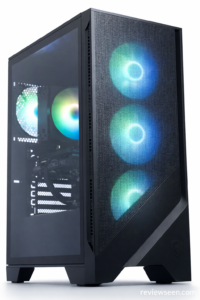
The MSI Codex Z2 Gaming Desktop – Ryzen 7 8700F & RTX 5070 and its variants are prebuilt gaming desktops designed to deliver strong performance for modern games at 1080p and even 1440p resolutions without costing as much as high-end rigs. MSI’s Codex series has earned attention for blending solid hardware with ease of use right out of the box.
This review breaks down what you should expect from the Codex Z2, how it performs in real gaming scenarios, and whether it’s worth your purchase.
🔎 What You Get in the MSI Codex Z2
Depending on the configuration, the Codex Z2 comes with:
- AMD Ryzen 7-8700F processor — an 8-core chip capable of smooth gaming and multitasking.
- NVIDIA GeForce graphics — RTX 5070 in higher-end builds, or RTX 5060 in more budget-oriented versions.
- Fast DDR5 memory (often 32 GB) — plenty for gaming and creative work.
- Large SSD storage like 1 TB or 2 TB NVMe drives for quick load times and abundant game space.
- Windows 11 Home installed and a range of ports including USB-C and Wi-Fi support.
Whether you pick the RTX 5070 model or something with an RTX 5060 or RTX 4070 GPU, the Codex Z2 targets gamers who want a balance of performance and price without building a PC from parts.
🧪 Real-World Performance
🎮 Gaming Power
In typical configurations with an Ryzen 7 and RTX 5070, the Codex Z2 delivers smooth frame rates at high settings in modern titles. It’s well suited for 1080p gaming and capable at 1440p with stable performance in most AAA games.
Even with mid-tier graphics like the RTX 5060 or 4060-class options in some listings, this machine handles esports titles and less demanding AAA games without struggling.
🧠 Everyday Tasks & Multitasking
With abundant DDR5 RAM and a fast SSD, the Codex Z2 isn’t just a gaming box. It can handle everyday workloads like browsing, streaming, and even light content creation with minimal hiccups.
❄️ Cooling and Acoustics
MSI’s chassis design includes mesh panels and multiple fans for good airflow. While gaming under load you may notice fan noise, but the system stays within comfortable limits and temperatures stay in check.
📊 Pros & Cons
👍 Pros
- Powerful mid-range hardware with strong gaming performance.
- Fast NVMe SSD ensures quick boot times and game loading.
- Plenty of expansion room for future upgrades.
- Ready-to-play out of the box with Windows 11 and included accessories.
👎 Cons
- Pricing varies widely depending on configuration and GPU choice.
- High-end GPUs like RTX 4070 versions cost more and may edge out budget expectations.
- Some cooling noise under heavy loads.
🏁 Final Verdict
The MSI Codex Z2 Gaming Desktop lineup is an excellent choice for gamers who want solid performance without building a PC themselves. Whether you go for the RTX 5070 model for high-end gaming or a 5060/4070 option for balanced value, you’re getting a capable machine that handles modern games and everyday tasks with ease.
Its combination of fast processors, DDR5 memory, and ample SSD space makes it suitable for most gamers and creators looking for a prebuilt rig they can use immediately.
🛒 Where to Buy
Here are some popular versions of the MSI Codex Z2 gaming desktop you can consider:
- MSI Codex Z2 Gaming Desktop – Ryzen 7 8700F & RTX 5070 – Balanced performance for modern gaming and multitasking
- Msi Codex Z2 Gaming PC – Ryzen 7 8700F, RTX 5070 32 GB RAM, 2 TB SSD – Spacious storage and plenty of RAM for demanding tasks
- MSI Codex Z2 Gaming Desktop – AMD R7‑8700F, GeForce RTX 5060 – Good mid-range option if you want strong performance at a lower cost
- MSI Codex Z2 Gaming Desktop – AMD R7‑8700F, GeForce RTX 4070 – Higher-tier choice with upgraded graphics potential
👉 Buy the MSI Codex Z2 Gaming Desktop review here:
https://www.reviewseen.com/msi-codex-z2-gaming-desktop-review/
❓ Frequently Asked Questions
Is the Codex Z2 good for 1440p gaming?
Yes, models with RTX 5070 GPUs are capable of smooth 1440p performance at high settings in many modern games.
Can you upgrade components later?
Yes. MSI uses standard PC parts, so you can upgrade RAM, storage, or even the GPU down the line.
Does it come with peripherals?
Many listings include an MSI gaming keyboard and mouse so you can start gaming right away.


